The information on this page is primarily for people who are renewing their medical certificate with the Aviation Clinic for the first time, and who have not used SkyCert before
For CASA medicals, you don't need to register on SkyCert. The medical itself will be done using CASA’s MRS (Medical Records System). Login to MyCASA and access the the MRS from there.
For CAA of NZ medicals we use the SkyCert online medical certification app. The following takes you through how to get yourself set up for your first medical application.
Once you have done your first application the system retains all your information for future applications, all you will need to do is update any new information at each application. You can also set up reminders for yourself in Skycert, you are able to upload documents yourself, and to log in to view your medical.
For a CAA of NZ renewal simply complete the steps below and then attend for your appointment.
1. First, register on the Skycert website: Go to https://www.skycert.nz/user/signup If the confirmation email does not show up in your inbox then check your junk mail folder.
2. Add current certificate expiry dates: When you register your details please take time to enter the expiry dates of your current certificates. (important because it will impact what expiry date comes out on the cert when it is issued)
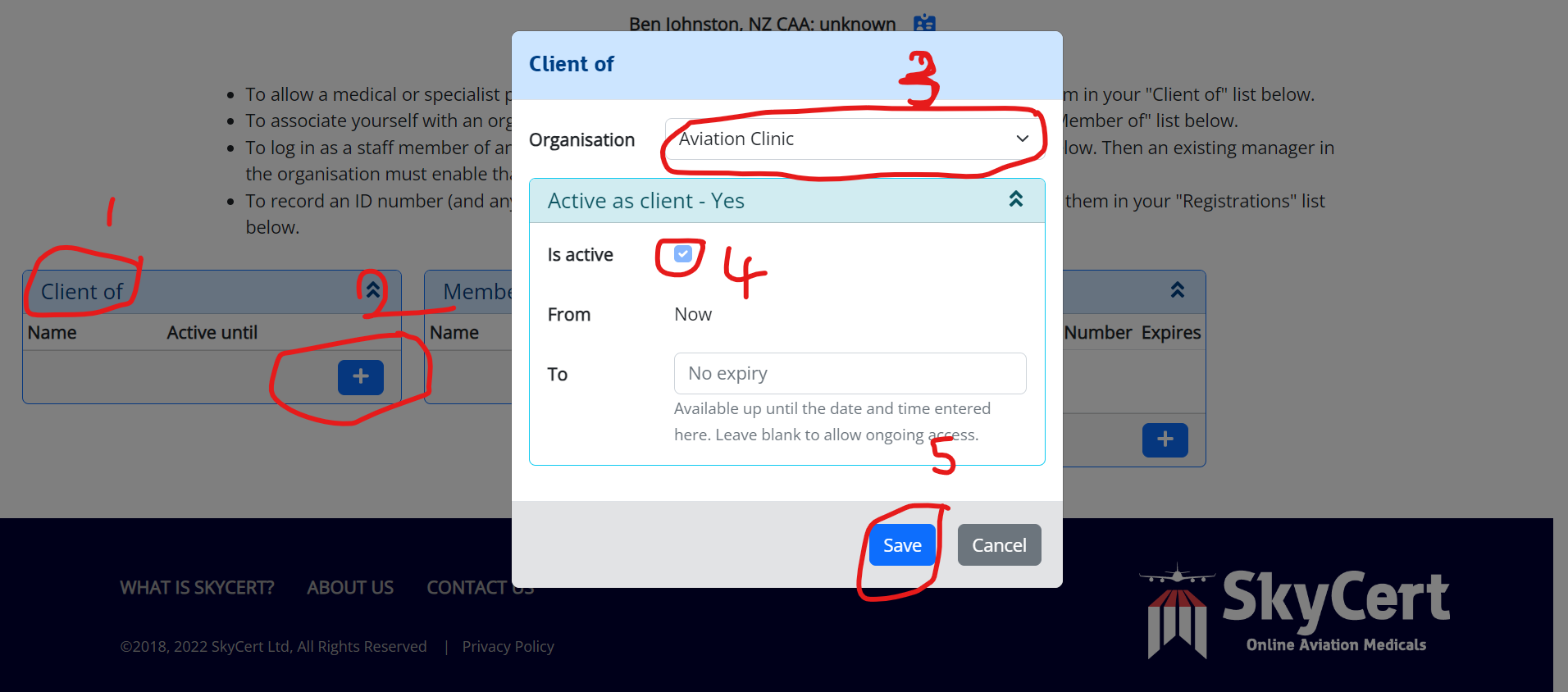
3. Give us access to your file and register your regulator: This step is really important and is the one people miss most often. Without doing this we can't create your bood test request forms or do any other work in your SkyCert file.
-First, go to your ‘Profile’ page in SkyCert.
-Find the tab labelled 'Organisations',
-Then in the section 'Client Of' click on the blue + symbol to add a new organsiation
-Select 'Aviation Clinic' from the dropdown list
-Check the 'Active' box is ticked
-Save
Once you have given us access let us know by email to admin@aviation.clinic
-Next, still within the 'Organisations' tab of the'Profile' page, find the section labelled 'Registrations'
-Click on the blue + symbol
-Select 'New Zealand Civil Aviation Authority' from the dropdown list
-Save
4. Pay the CAA application fee on their website:
https://sec.caa.govt.nz/OnlinePayment/Prod
Once paid the CAA system will email a receipt to you. Keep the email and add receipt number to your medical application form (see below).
- Complete the medical application form online: After confirming your email, log in, go to the Dashboard. Under the heading ‘My Medicals’ on that page, select ‘start a new medical’. Complete all of the mandatory fields, including the receipt number. Once you have completed the form scroll to the bottom and click ‘Save’, then scroll to the bottom again and click ‘Sign’
6. Scan, or take a photo of your current medical certificate, front and back, and upload to SkyCert (file upload button is in top right of ‘Medical Overview’ screen. ‘Previous medical’ is in the dropdown list for file types, right near the end)
7. If we have already locked out an appointment time for you, then there is nothing further to do at this stage. If you need to book your appointment time, read on.
8. If you need to book an appointment: Go to the appointments section of Skycert, filter by 'Aviation Clinic' in the Practice field and then by location. Select dates that one of the team is available from the calendar. Select your preferred time and confirm. Or else email us at admin@aviation.clinic
9. Payment: We will send you an invoice which can be paid online. Information about current fees can be found here